

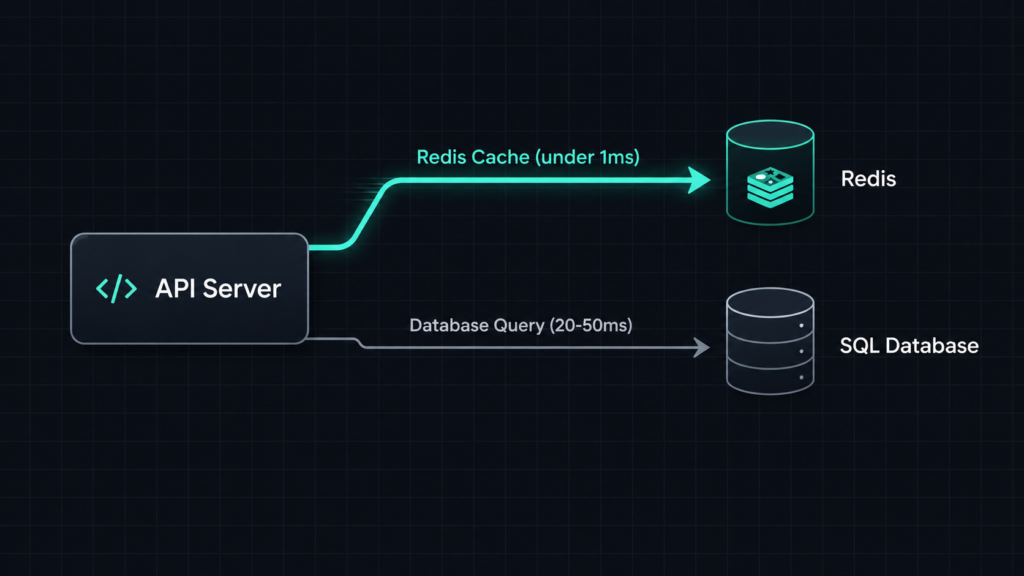
If you build APIs, you will hit a database performance wall sooner or later. The usual fix is Redis caching. Redis is an in-memory data store that sits in front of your database and answers repeated reads in under a millisecond instead of tens of milliseconds. In this guide, I will show you what Redis actually does, how to add caching to a .NET or Node.js API, which mistakes to avoid, and when Redis is not the right tool at all.
Quick answer: Redis caching means storing frequently read data in memory, using a key-value store like Redis, instead of hitting your primary database every time. Your app checks Redis first. If the data is there (a cache hit), it returns fast. If not (a cache miss), it reads from the database, then saves the result in Redis for next time.
What Redis Actually Is
Redis started as a simple key-value store. Today it is more like a small toolbox of data structures that all live in RAM. You get strings, hashes, lists, sets, sorted sets, streams, and (since Redis 8) vector sets for similarity search. Because everything lives in memory, reads and writes are extremely fast compared to a disk-based database like SQL Server or PostgreSQL.
Redis is single-purpose by design. It does not replace your relational database. It sits next to it and takes pressure off it.
Common use cases:
- Caching database query results
- Session storage for web applications
- Rate limiting for APIs
- Distributed locks in microservices
- Real-time leaderboards using sorted sets
- Pub/Sub messaging between services
- Job queues for background workers
A Quick Note on Licensing
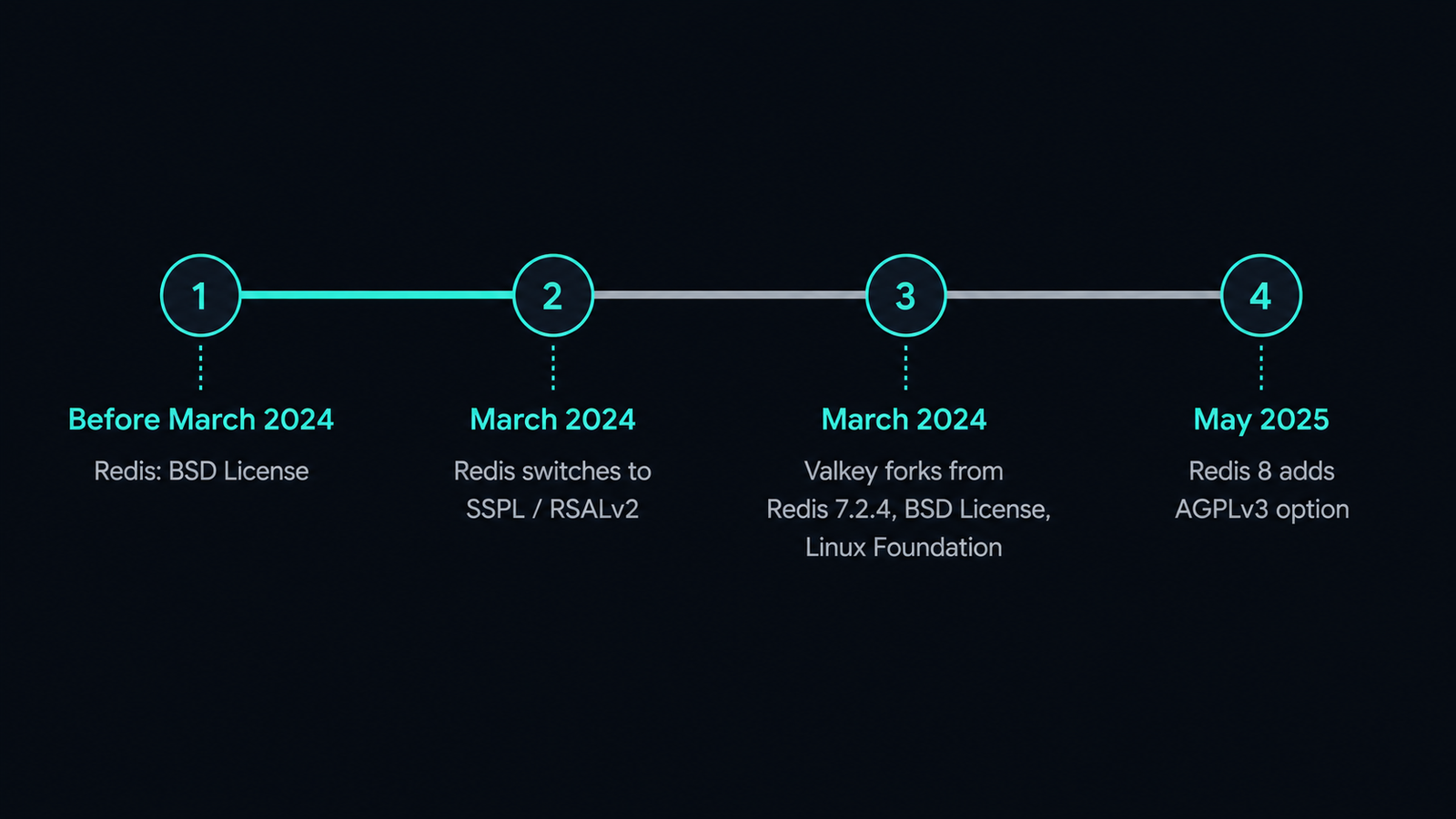
If you last checked Redis licensing a couple of years ago, it is worth a second look. In March 2024, Redis Ltd. moved Redis away from the permissive BSD license to a source-available model (SSPL and RSALv2), which is not OSI-approved open source. The change affects how you use, update, and build on Redis, especially if your company offers Redis as a managed, hosted, or SaaS product.
The community reaction was fast. The Linux Foundation, together with AWS, Google Cloud, Oracle, Ericsson, and others, created Valkey, a true open-source fork of Redis 7.2.4 under the BSD 3-Clause license. In May 2025, Redis Ltd. course-corrected and added AGPLv3 as an additional, OSI-approved licensing option starting with Redis 8, alongside the existing source-available tiers.
So in practice, as of 2026, you have three realistic choices:
- Redis 8.x under AGPLv3, SSPLv1, or RSALv2 (pick one)
- Valkey, the BSD-licensed, Linux Foundation-governed fork
- A Redis-compatible alternative such as DragonflyDB or KeyDB
Valkey is a fork of Redis OSS version 7.2 and stays fully open source under BSD, while Redis OSS 7.2 remains the last fully open source Redis version before the license change. If your legal team has a strict no-AGPL policy, or you run a managed cache service, Valkey is usually the safer default in 2026. If you rely on Redis Enterprise features or the newer vector search capabilities, staying on Redis 8 still makes sense for many teams. The good news for this article: the commands, client libraries, and caching patterns below work the same way on both, since Valkey keeps wire-protocol compatibility with Redis.
When to Use Redis Caching (and When Not To)
Redis caching solves a specific problem: expensive, repeated reads. It is not a universal fix.
Use Redis caching when:
- The same query runs often and the underlying data does not change every second (product catalogs, user profiles, configuration, permissions)
- Your database is under load from read-heavy traffic
- You need sub-millisecond response times for a specific endpoint
- You need shared state across multiple instances of a stateless API (sessions, rate limits, feature flags)
Avoid Redis caching when:
- The data changes on every request, so the cache would almost never be used
- Strong consistency matters more than speed (financial balances, inventory counts at checkout)
- The dataset is small enough that your database already answers in a few milliseconds
- You do not have a clear invalidation strategy yet. A cache with stale data is often worse than no cache at all
I have seen teams add Redis to a project before they even measured where the actual bottleneck was. Always profile first. If your slow endpoint spends most of its time in application code, not the database, caching will not help much.
How Redis Caching Works in Practice
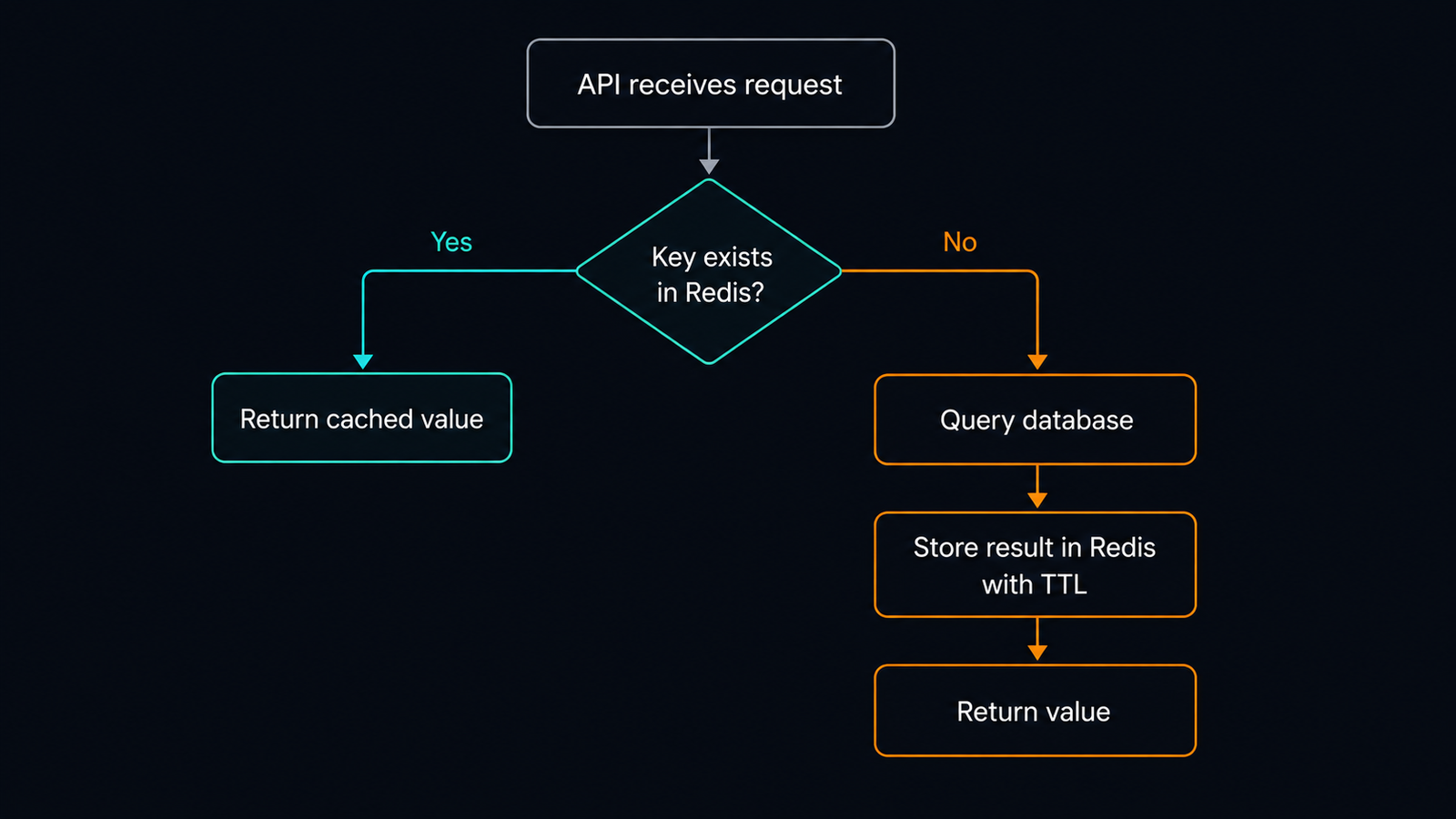
The pattern most teams use is called cache-aside (also known as lazy loading):
- The API receives a request
- It checks Redis for the cached value
- If found (cache hit), it returns the value directly
- If not found (cache miss), it queries the database
- It stores the result in Redis with an expiration time
- It returns the value to the caller
Example: Cache-Aside in .NET with StackExchange.Redis
StackExchange.Redis is the standard Redis client for .NET. Here is a minimal cache-aside implementation for an ASP.NET Core API:
// Program.cs
builder.Services.AddSingleton<IConnectionMultiplexer>(
    ConnectionMultiplexer.Connect(builder.Configuration.GetConnectionString("Redis")));
public class ProductService
{
private readonly IDatabase _cache;
private readonly IProductRepository _repository;
public ProductService(IConnectionMultiplexer redis, IProductRepository repository)
{
_cache = redis.GetDatabase();
_repository = repository;
}
public async Task<Product?> GetProductAsync(int productId)
{
string cacheKey = $"product:{productId}";
var cached = await _cache.StringGetAsync(cacheKey);
if (cached.HasValue)
{
return JsonSerializer.Deserialize<Product>(cached!);
}
var product = await _repository.GetByIdAsync(productId);
if (product is null)
{
return null;
}
var serialized = JsonSerializer.Serialize(product);
await _cache.StringSetAsync(cacheKey, serialized, TimeSpan.FromMinutes(10));
return product;
}
}A few things worth noticing here. The cache key includes the entity type and id, which keeps keys readable and easy to invalidate later. The expiration time (TimeSpan.FromMinutes(10)) protects you from serving stale data forever, even if you forget to invalidate the cache manually.
Example: Cache-Aside in Node.js with ioredis
The same pattern in a Node.js API using ioredis:
const Redis = require('ioredis');
const redis = new Redis(process.env.REDIS_URL);

async function getProduct(productId) {
  const cacheKey = `product:${productId}`;

  const cached = await redis.get(cacheKey);
  if (cached) {
    return JSON.parse(cached);
  }

  const product = await productRepository.findById(productId);
  if (!product) {
    return null;
  }

  await redis.set(cacheKey, JSON.stringify(product), 'EX', 600);
  return product;
}
EX 600 sets a 600-second (10-minute) expiration, the same as the .NET example. Keeping expiration times consistent across services makes cache behavior easier to reason about when you are debugging.
Cache Invalidation Strategies
Cache invalidation is the part developers usually get wrong, not the caching itself. Here are the three approaches I use most often:
| Strategy | How it works | Best for |
|---|---|---|
| Time-based expiration (TTL) | Data expires automatically after N seconds | Data that tolerates a short delay before updates appear |
| Write-through invalidation | You delete or update the cache key right after writing to the database | Data that must be fresh immediately after a write |
| Event-based invalidation | A message (via Kafka, RabbitMQ, or Redis Pub/Sub) tells other services to clear related keys | Distributed systems with multiple services touching the same data |
For most CRUD APIs, a short TTL combined with write-through invalidation on updates covers 90 percent of cases. Reserve event-based invalidation for cases where several services can change the same entity.
public async Task UpdateProductAsync(Product product)
{
    await _repository.UpdateAsync(product);
    await _cache.KeyDeleteAsync($"product:{product.Id}");
}
Deleting the key on write is simpler and safer than trying to update the cached value directly. Let the next read rebuild the cache with fresh data.
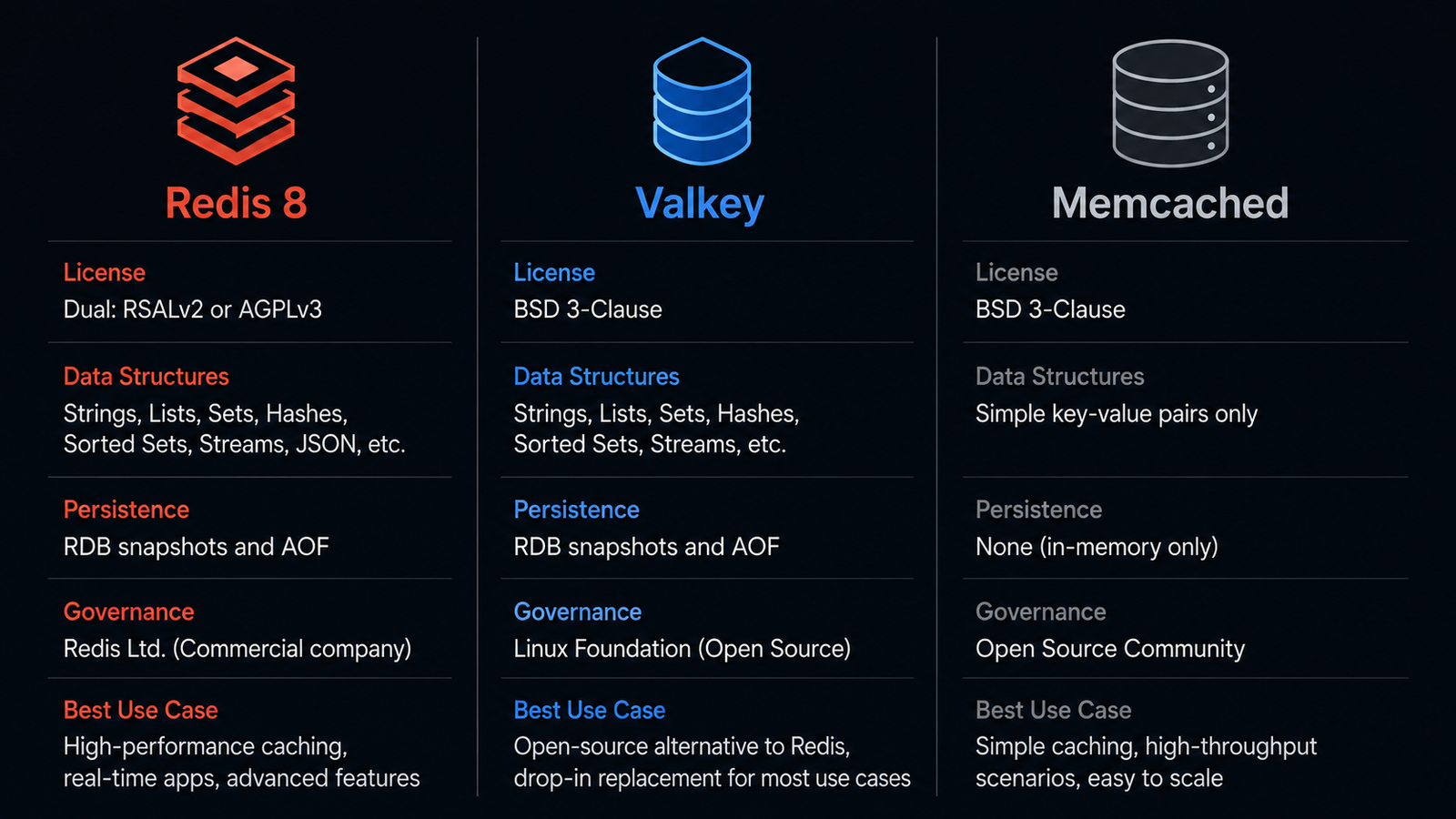
Redis vs Valkey vs Memcached: Choosing the Right Store
| Feature | Redis 8 | Valkey | Memcached |
|---|---|---|---|
| License | AGPLv3 / SSPLv1 / RSALv2 | BSD 3-Clause | BSD-style |
| Data structures | Strings, hashes, lists, sets, sorted sets, streams, vector sets | Same as Redis 7.2, plus its own roadmap | Strings only |
| Persistence | Yes (RDB, AOF) | Yes | No |
| Pub/Sub, locks, queues | Yes | Yes | No |
| Multithreaded I/O | Limited | Yes, since Valkey 8 | Yes |
| Governance | Redis Ltd. (commercial company) | Linux Foundation | Community |
| Best use case | Apps needing vector search or Redis Enterprise features | Teams wanting a permissive license and cloud-native performance | Pure, simple object caching with nothing else |
There is no universal winner here. If you only need to cache plain strings or objects and nothing else, Memcached is still a fine, boring choice with a smaller footprint. If you need data structures, persistence, or Pub/Sub on top of caching, Redis or Valkey are the better fit. Between Redis and Valkey specifically, the decision today comes down mostly to licensing preference and whether you depend on Redis-specific modules like the newer vector search features.
Common Mistakes Developers Make
1. Caching everything by default
Developers sometimes wrap every repository method in a cache call. This adds complexity without real benefit for data that is rarely read twice. Cache the endpoints that actually show up in your slow query logs.
2. No expiration time
Setting a key with no TTL means it lives in Redis until someone remembers to delete it, or forever. Always set an expiration, even a long one, as a safety net.
3. Using the cache as the source of truth
Redis is fast but it is still a cache. If Redis restarts without persistence enabled, or a key gets evicted under memory pressure, that data is gone. Never store data in Redis that does not also exist in a durable database.
4. Cache stampede on popular keys
When a hot cache key expires, hundreds of concurrent requests can hit the database at the same time trying to rebuild it. Use a short lock (SET key value NX EX 5) so only one request rebuilds the cache while others wait or serve slightly stale data.
5. Ignoring key naming conventions
Keys like p123 or tempdata become unreadable fast. Use a consistent pattern such as entity:id:field, for example product:123:price. This also makes bulk invalidation with pattern matching much easier.
6. Forgetting about memory limits
Redis keeps everything in RAM. Without an eviction policy (maxmemory-policy), Redis can either reject writes or crash when memory runs out. Set allkeys-lru or volatile-lru depending on whether all your keys are cacheable or only some.
Performance, Security, and Production Considerations
Performance
- Use pipelining when you need to send multiple commands at once. It cuts round-trip time significantly.
- Watch your
SCANusage.KEYS *blocks the entire Redis instance on large datasets. Always useSCANwith a cursor instead. - Monitor hit ratio, not just latency. A low hit ratio means your caching strategy is not matching real traffic patterns.
Security
- Never expose Redis directly to the public internet. Keep it inside a private network or VPC.
- Set a strong password with
requirepass, or better, use ACLs (available since Redis 6) to limit what each client can do. - Enable TLS for connections that cross network boundaries, such as between a Kubernetes cluster and a managed Redis or Valkey instance.
Production
- Enable persistence (RDB snapshots, AOF, or both) if losing cached data on restart would hurt user experience, for example with session storage.
- Set up monitoring for memory usage, evicted keys, and connected clients. Grafana with the Redis exporter for Prometheus covers this well.
- For high availability, use Redis Sentinel or a managed service with automatic failover. A single Redis instance is a single point of failure.
- If you run Redis in Kubernetes, use a StatefulSet with persistent volumes, not a plain Deployment, so data survives pod restarts.
Step-by-Step: Adding Redis Caching to an Existing API
Step 1: Run Redis locally
docker run -d --name redis -p 6379:6379 redis:8Or, if you prefer the BSD-licensed fork:
docker run -d --name valkey -p 6379:6379 valkey/valkey:9Step 2: Add the client library
For .NET:
dotnet add package StackExchange.RedisFor Node.js:
npm install ioredisStep 3: Wrap your slowest endpoint
Pick one endpoint from your slow query logs, not your whole API. Add the cache-aside pattern shown earlier around that single method.
Step 4: Test it
Call the endpoint twice. The first call should hit the database. The second call, within your TTL window, should return from Redis. Check response time in your logs or with a tool like curl -w "%{time_total}".
Step 5: Add invalidation and monitoring
Add a KeyDeleteAsync (or redis.del) call to whatever write path updates that entity. Then add basic metrics: cache hit count, cache miss count, and average response time. This turns “it feels faster” into a number you can track over time.
FAQ
Is Redis a database or a cache?
Redis can be both. It is often used purely as a cache in front of a relational database, but it also supports persistence and can act as a primary data store for certain workloads, like session data or leaderboards.
Is Redis still open source in 2026?
Yes, with a choice. Redis 8 offers AGPLv3 as an OSI-approved open source option, alongside two source-available licenses. Valkey, the community fork, stays under the fully permissive BSD license.
Should I use Redis or Valkey for a new project?
For most new projects, especially if you plan to self-host or use a managed cloud cache, Valkey is a safe default because of its permissive license and active development. If you need Redis-specific features like vector sets for AI search, Redis 8 is worth considering.
How is Redis different from Memcached?
Redis supports multiple data structures (hashes, lists, sets, sorted sets), persistence, and Pub/Sub. Memcached only stores simple key-value strings with no persistence. Memcached can be simpler and slightly faster for pure caching, but Redis covers far more use cases.
Does Redis guarantee data will never be lost?
No, not by default. Redis is an in-memory store first. You need to enable persistence (RDB or AOF) and configure replication if losing data on a crash is not acceptable for your use case.
Can I use Redis for rate limiting?
Yes, this is one of its most common uses. A simple pattern uses INCR with an expiration on a key per user or IP address, which gives you an atomic counter that resets automatically.