

If you run Claude Code, Codex, or OpenCode every day, you already know the pattern. Your agent burns a full model call to decide something small: is this test flaky, is this log line an error, does this PR do what the title says. That is expensive and slow for a task that is really just a yes/no answer. This is where Jev comes in. In this guide, I will show you how to use Jev in Claude Code, OpenCode and Codex, what problem it actually solves, and where it does not make sense.
I have used Claude Code and Codex daily for backend work, and I tested a few of the community integrations that connect them to Jev. This article is based on that, plus TypeSafe’s own documentation. By the end, you will know what Jev is, how to wire it into your agent of choice, and what to watch out for in production.
What Is Jev? (Quick Answer)
Jev is a “System One” model from TypeSafe AI, released in September 2026. Unlike a normal LLM, it does not generate text. It takes your code’s current state plus a set of typed questions, and returns typed answers with a probability score, in one fast pass. Coding agents like Claude Code, Codex and OpenCode can call it to classify, score, or check things without spending a full reasoning call.
Why This Matters for Coding Agents
Claude Code, Codex, and OpenCode all run in a loop: read the task, call a tool, look at the result, decide the next step. A lot of those decisions are tiny. Some real examples from daily agent work:
- Is this CI failure a real bug or a flaky test?
- Does this file actually matter for the current task?
- Is this shell command safe to auto-approve?
- Does this PR description match the actual diff?
Doing this with your main model works, but it is slow and it eats your context window and your bill. Jev is built for exactly this kind of small, repeated judgment call. TypeSafe frames it as a “smart if-statement”: you give it a state and a question, and you get a typed answer back, with a confidence score attached.
This does not replace Claude Code, Codex, or OpenCode. It sits next to them, handling the small decisions so your main agent can spend its budget on the actual coding work.
Jev vs Calling Your Main LLM for the Same Decision
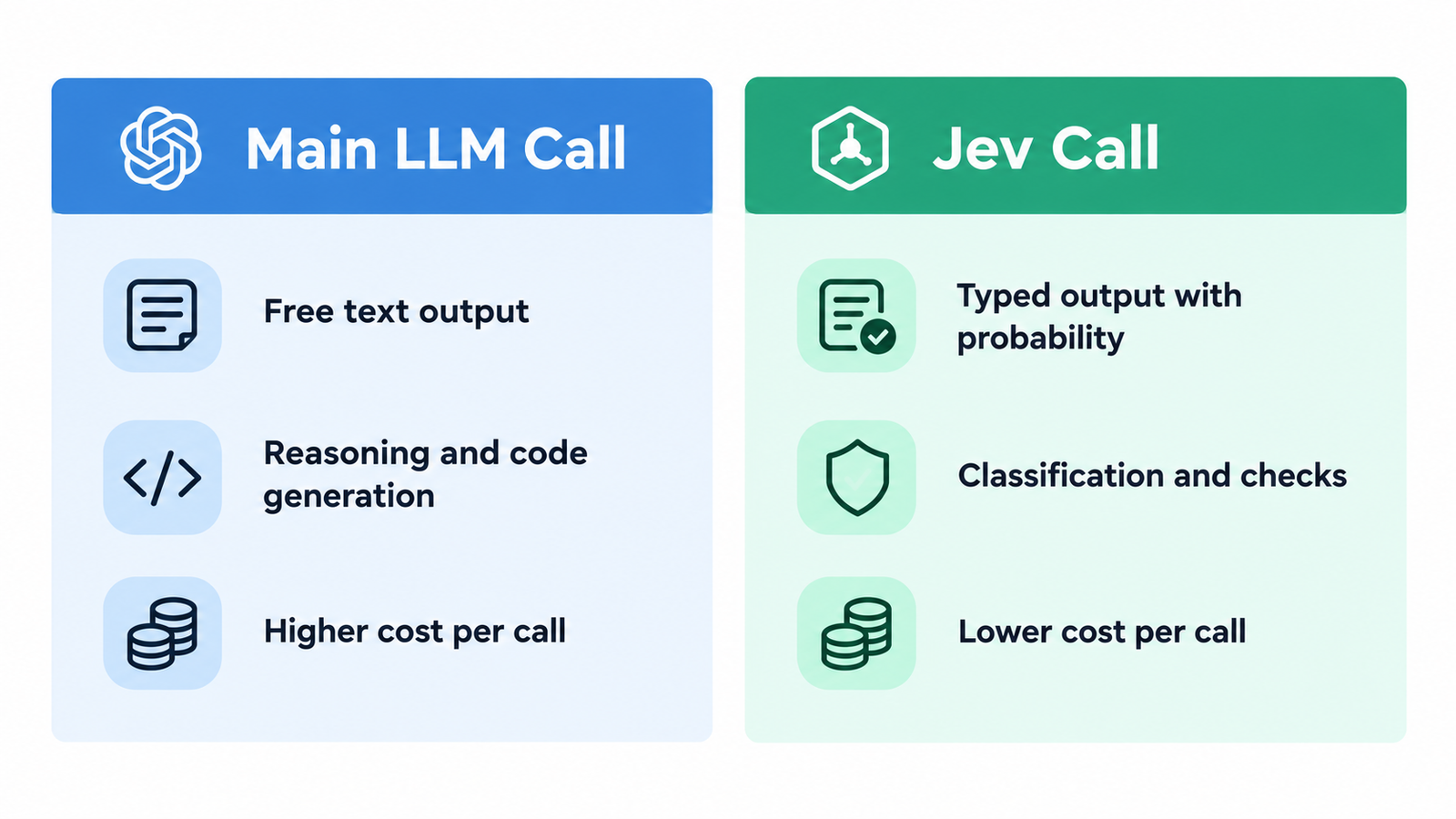
| Aspect | Calling Your Main LLM | Calling Jev |
|---|---|---|
| Output type | Free text, needs parsing | Typed value with a probability |
| Speed | Seconds, grows with prompt size | Sub-second, roughly flat as you add questions |
| Cost per call | Full input and output tokens | Input tokens only; output is currently free |
| Context usage | Uses your agent’s context window | Runs outside the main context |
| Best for | Reasoning, writing code, planning | Classification, scoring, yes/no checks |
| Production readiness | Mature, widely used | Early access, still young |
The practical takeaway: keep your main model for anything that needs judgment across a full codebase or generates new code. Route the repetitive, structured checks to Jev instead. Do not try to make Jev write code or explain a bug. That is not what it is built for.
How Coding Agents Actually Reach Jev
There are two common patterns right now, based on the early community tooling built around Jev.
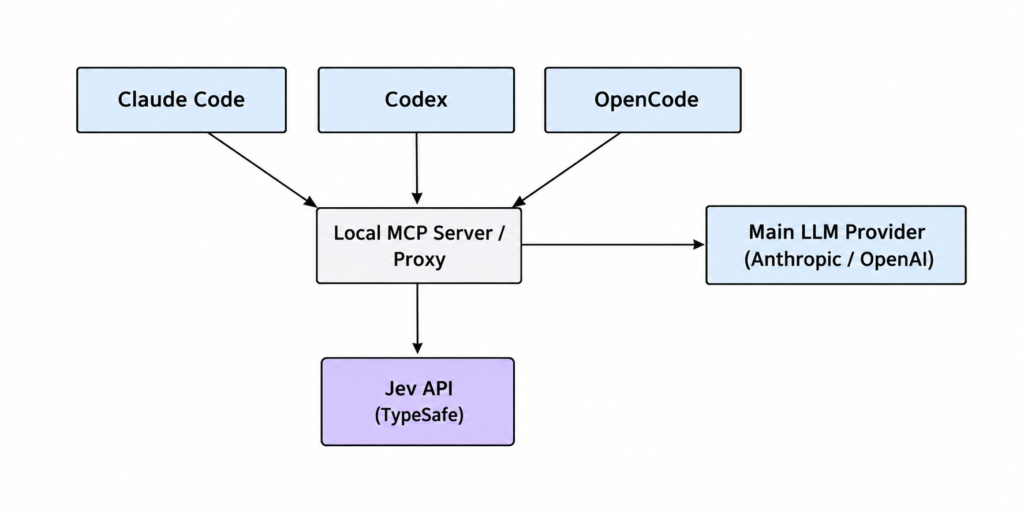
1. As an MCP tool. Claude Code, Codex and OpenCode all support the Model Context Protocol (MCP). A small local MCP server can expose Jev as a set of tools, for example a classify tool, a check tool, and a score tool. Your agent calls these tools the same way it calls any other tool, and a skill file can tell it when to reach for them instead of reasoning it out itself.
2. As a request router. A lightweight local proxy sits between your CLI and the model provider. It inspects each turn, asks Jev which tier of model fits the task (a typo fix versus a hard debugging session, for example), and forwards the request to a cheaper or stronger model. This does not touch your existing login or config; it only affects sessions started through the wrapper command.
Both patterns exist as separate open-source projects right now, built by different developers on top of TypeSafe’s public API. There is no single official Anthropic, OpenAI, or OpenCode integration yet, so check each project’s README before you install anything, and treat any of these tools as community software, not an official product.
Step-by-Step: Adding Jev to Claude Code
This walkthrough uses the MCP pattern, since it is the most direct way to give Claude Code a real classification tool.
Step 1: Get a Jev API Key
Sign up for TypeSafe’s early access program and get an API key. You can also reach Jev through OpenRouter or the Vercel AI Gateway if you already have credits there and do not want to wait for direct access.
Step 2: Install an MCP Server That Wraps Jev
Look for a maintained MCP server built for this (search GitHub for “jev” plus “MCP” or “Claude Code”). Most of these ship as a small CLI with a setup command that registers the server with Claude Code automatically. Follow the project’s own README for the exact install command, since this space is moving fast and commands change between releases.
Step 3: Configure Claude Code to See the Server
Claude Code reads MCP server configuration from its settings. A typical entry looks like this:
{
  "mcpServers": {
    "jev": {
      "command": "npx",
      "args": ["jev-mcp-server"],
      "env": {
        "TYPESAFE_API_KEY": "your-api-key-here"
      }
    }
  }
}
Adjust the command and args to match whichever server you installed. Restart Claude Code after saving the config so it picks up the new tool.
Step 4: Let the Agent Use It
Once the tool is registered, you do not need to call it by hand every time. Ask Claude Code to do something that involves a repeated judgment, for example:
“Go through these 40 failing test names and tell me which ones look like real regressions versus flaky infra tests.”
With a skill file in place, the agent knows to send each test name to Jev as a classification question instead of reasoning about all 40 in its own context.
Step 5: Verify It Is Actually Being Used
Check your TypeSafe usage dashboard, or the CLI’s own usage command if the wrapper you installed has one. You should see a batch of small, fast calls corresponding to the classification task, separate from your main model’s token usage.
Step 6: Production Considerations
Before you rely on this in a real workflow:
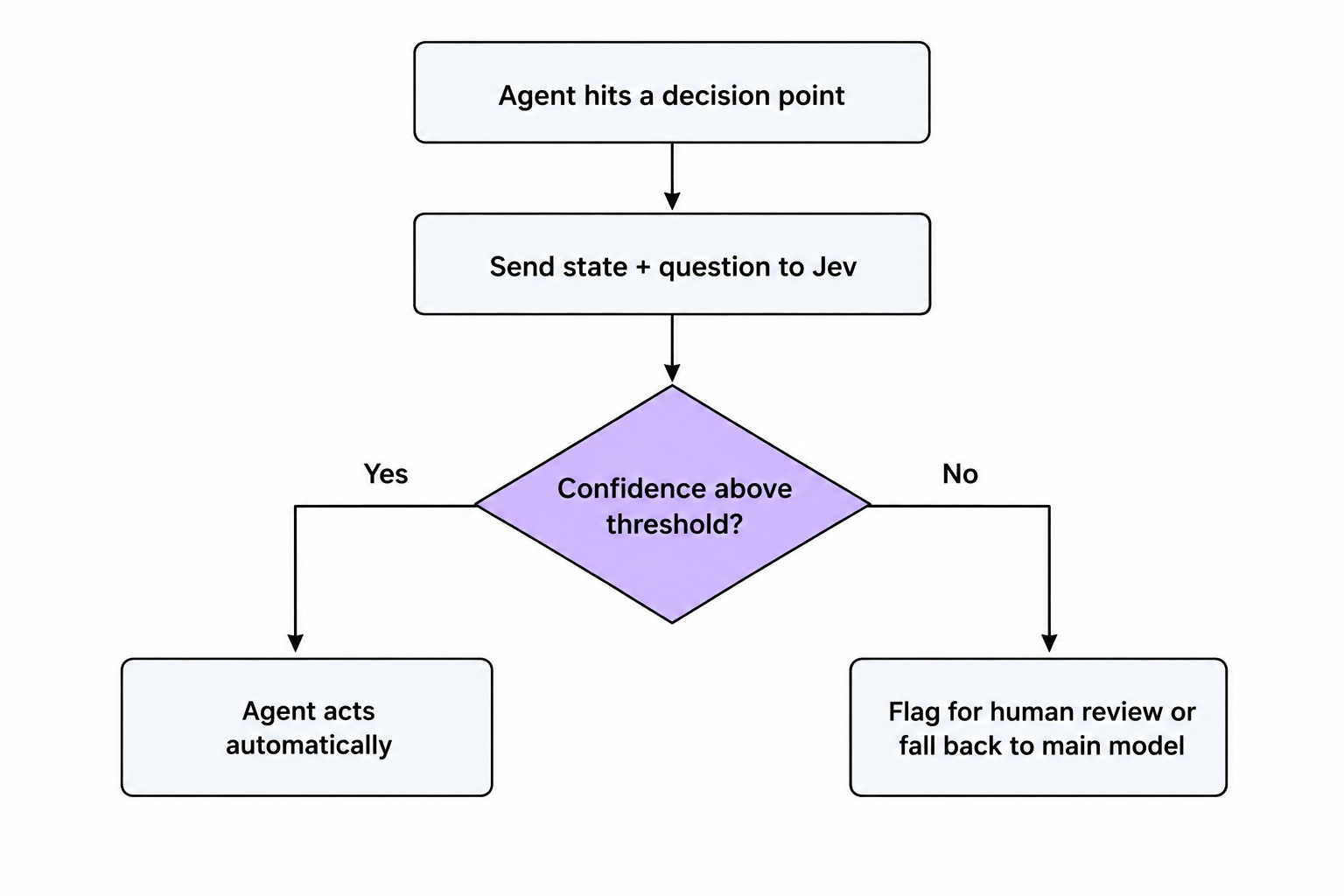
- Set a confidence threshold. Do not treat every Jev answer as final. A common pattern is: act automatically above 90% confidence, otherwise flag for a human or fall back to the main model.
- Keep a fallback path. If the Jev API is down or your key is missing, your agent should degrade gracefully, not crash the whole session.
- Watch your input size. Jev bills by input tokens. Sending a full log file for a simple “is this an error” check wastes money; trim to the relevant lines first.
Using Jev with OpenCode
OpenCode’s anthropic provider setting means it can point at the same kind of local proxy used for Claude Code, since both speak the same Messages API shape. In practice this means:
- Start the local Jev-aware proxy or MCP server.
- Point OpenCode’s configuration at it, typically through an environment variable or a config file merge, so your existing global settings (like other MCP servers you already use) stay in place.
- Run OpenCode as usual. The extra routing or classification step happens behind the scenes.
The main thing to check with OpenCode is whether the wrapper you chose merges your existing config or replaces it. A well-built tool merges, so you do not lose settings you already had.
Using Jev with Codex
Codex works a little differently, since it is not built around a simple base-URL override the same way. Community wrappers handle this by launching Codex with a temporary custom model provider that forwards your existing authorization headers, so your real login is never touched. From your side, the workflow looks the same as plain Codex: you type your prompt, the CLI does its thing, and the routing or classification happens in the background through the wrapper.
If you use Codex’s cloud workflows instead of the local CLI, check whether the wrapper you are using supports that mode specifically. Most of the current tools target the local CLI first.
Common Mistakes Developers Make
1. Trying to use Jev for generation. Jev does not write code, explain bugs, or hold a conversation. If you find yourself asking it open-ended questions, you are using the wrong tool for the job.
2. Treating probability as certainty. A 0.87 confidence score is not “yes.” Decide your threshold up front and write the fallback path before you ship anything that acts on Jev’s answer automatically.
3. Sending too much raw context. Copy-pasting an entire error log into a classification call increases your input token cost for no real benefit. Trim to what actually answers the question.
4. Skipping usage tracking. Since output tokens are currently free but input tokens are billed, it is easy to lose track of real spend if you are not checking a usage report regularly.
5. Hardcoding the API key in the wrapper config. Treat the Jev API key like any other secret: environment variable or a secrets manager, never committed to your repo.
6. Assuming one tool works everywhere. A wrapper built for Claude Code will not automatically work with Codex or OpenCode. Check the project scope before you install.
Performance, Security and Production Notes
Performance: TypeSafe reports end-to-end latency around 70 to 500 milliseconds from their own infrastructure. If your team is outside the US, add real network latency on top and measure it yourself before you promise anything to end users. Parallel questions in one call barely add latency, so batch related questions together instead of making separate calls.
Security: Your API key should never leave your machine or your CI environment unencrypted. If you route sensitive code or customer data through Jev, apply the same input validation and data handling policy you already use for any third-party AI API.
Production: As of early access, TypeSafe lists rate limits around 250,000 tokens per second and 1,200 requests per minute, adjusting during this phase. Build in retry and backoff logic, and make sure your agent can fall back to normal behavior (asking your main model, or asking a human) if Jev is unavailable or rate-limited.
When I Would (and Would Not) Use This
I would reach for Jev when a coding agent needs to make the same kind of small decision many times: filtering CI noise, ranking which files matter for a task, or checking whether a shell command is safe to auto-approve. The cost and speed difference is real for that kind of workload.
I would not use it to replace my main model for anything that needs actual reasoning across a codebase, writing new code, or explaining a decision to a teammate. It is also still early access, built by a company that launched days ago, so I would not put it on a critical path yet without a solid fallback.
FAQ
What is Jev used for in a coding agent?
Small, repeated judgment calls: classifying, scoring, or checking things, instead of using a full LLM call for each one.
Does Jev replace Claude Code, Codex, or OpenCode?
No. It works alongside them, handling small decisions so your main agent can focus on reasoning and code generation.
Is Jev free to use?
No, but it is cheap. TypeSafe bills for input tokens and currently offers free output tokens, with early access pricing that is much lower than typical LLM pricing.
Can I use Jev without changing my existing Claude Code or Codex setup?
Most community wrappers are designed this way. They run alongside your normal CLI and only affect sessions started through the wrapper command, leaving your default login and config untouched.
Is Jev an official Anthropic, OpenAI, or OpenCode feature?
No. Jev comes from TypeSafe AI, a separate company. The integrations for Claude Code, Codex and OpenCode are community-built tools, not official features.
External References
- TypeSafe AI, “Introducing System One Models & Jev” — https://typesafe.ai/blog/introducing-system-one-models-and-jev
- Wikipedia, “Jev (AI model)” — https://en.wikipedia.org/wiki/Jev_(AI_model)
- jev-code, MCP tool for Claude Code, Codex, Pi and OpenCode (GitHub) — https://github.com/FrancoisChastel/jev-code
- jev-gateway, gateway for Codex, Claude Code and OpenCode (GitHub) — https://github.com/vinilana/jev-gateway
- LangChain, “Building a Harness With Jev” — https://www.langchain.com/blog/building-a-harness-with-jev