

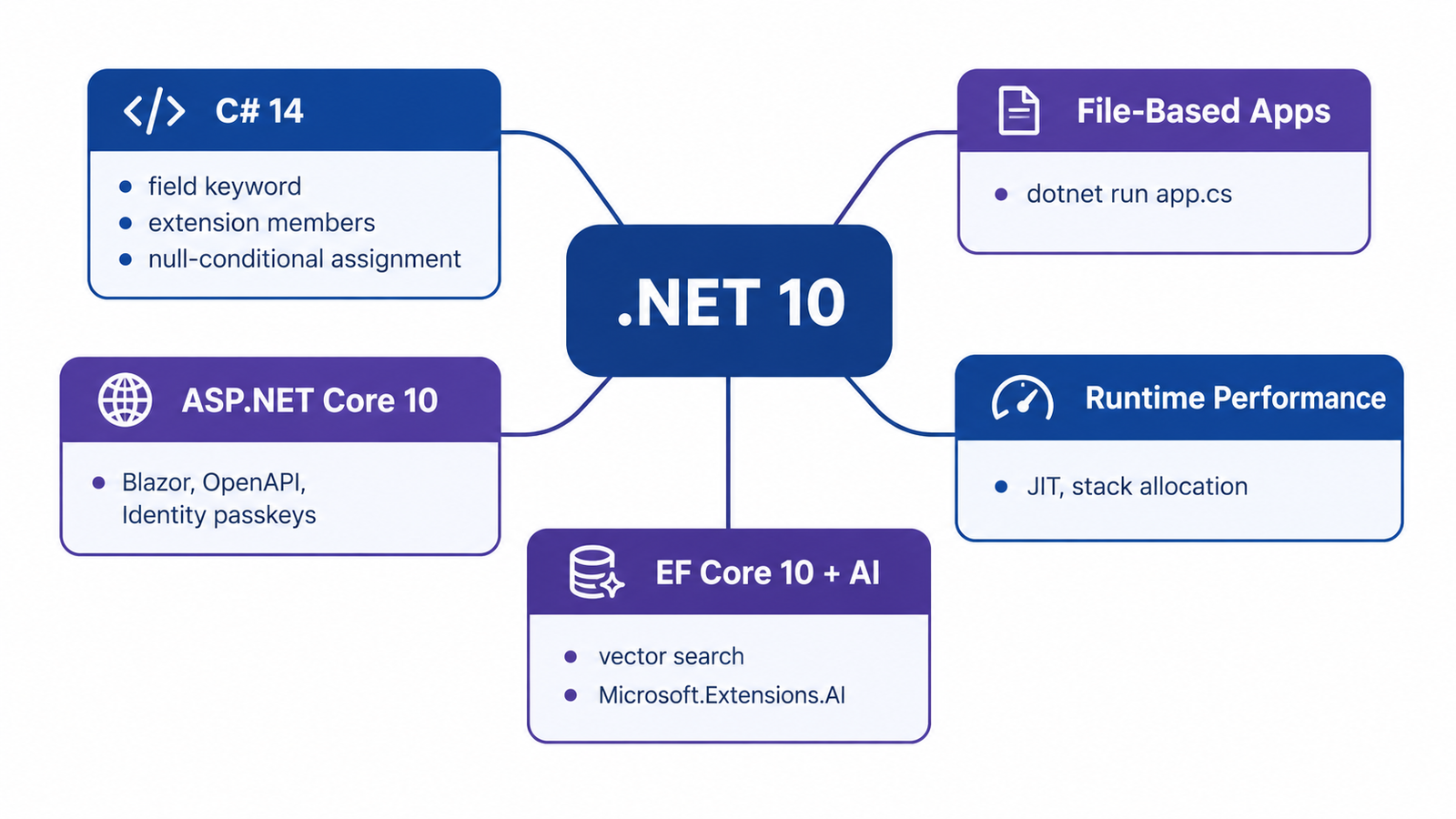
If you work with .NET every day, you already know a new major version ships every November. Most of the time, the release notes are long and half of it does not apply to your project. This article is different. I went through .NET 10, the new Long Term Support (LTS) release, and picked the changes that actually affect how you write and run code in production: C# 14, file-based apps, ASP.NET Core updates, EF Core 10, and the runtime performance work behind all of it.
Quick Answer: What Is New in .NET 10?
.NET 10 is a Long Term Support release with three years of support, until November 2028. The biggest changes are C# 14 (extension members, the field keyword, null-conditional assignment), a new way to run a single C# file without a project (dotnet run app.cs), faster JIT compilation, built-in AI abstractions through Microsoft.Extensions.AI, and EF Core 10 with vector search support.
Why This Release Matters
.NET 10 is an LTS release, which means Microsoft supports it for three years instead of the usual eighteen months for the in-between versions. That support runs until November 2028. If your team plans to stay on a version for a while without constant upgrades, this is the one to target.
It is also a release that focuses on things developers actually feel: startup time, memory use, less boilerplate in C#, and a smoother path from “quick script” to “real project.” Let’s go through what changed, section by section.
C# 14: Less Boilerplate, More Expressive Code
C# 14 ships together with .NET 10, and it is a good example of a release that polishes the language instead of adding something huge and disruptive.
Extension Members
Extension methods have existed since C# 3.0, but you could only extend types with methods. C# 14 adds extension members, so you can now write extension properties, static members, and operators too.
public static class StringExtensions
{
    extension(string text)
    {
        public bool IsCapitalized =>
            text.Length > 0 && char.IsUpper(text[0]);
    }
}

// Usage
bool result = "Hello".IsCapitalized; // true
This closes a gap that many developers hit when building fluent APIs or trying to add computed properties to types they do not own.
The field Keyword
Before C# 14, if you wanted to add logic to a property setter, you had to declare a private backing field manually. Now you can access the compiler-generated backing field directly with the field keyword.
public class Product
{
    public string Name
    {
        get => field;
        set => field = string.IsNullOrWhiteSpace(value)
            ? throw new ArgumentException("Name is required")
            : value.Trim();
    }
}
This is a small change, but it removes a very common piece of repeated code in almost every C# codebase.
Null-Conditional Assignment
This is the feature I use the most so far. Before C# 14, assigning a value to a property only when an object was not null needed an explicit if.
// Before C# 14
if (customer is not null)
{
    customer.LastOrder = GetCurrentOrder();
}

// C# 14
customer?.LastOrder = GetCurrentOrder();
The right side of the assignment only runs when the left side is not null. The null-conditional member access operators can now be used on the left hand side of an assignment or compound assignment, and this also works with +=, -=, and other compound operators.
File-Based Apps: dotnet run app.cs
This is probably the change that gets the most attention, and it is easy to misunderstand. .NET 10 introduced file-based apps, which let you write C# code in a single .cs file and run it directly, with no project or solution files, while keeping type safety, performance, and the standard library.
// hello.cs
Console.WriteLine("Hello from a file-based app!");
dotnet run hello.csYou can even reference NuGet packages directly inside the file using #: directives:
#:package Humanizer@2.14.1

using Humanizer;

Console.WriteLine("dotnet_ten".Humanize());
When a script outgrows one file, the dotnet project convert command turns it into a full project, so you are not locked into a single file forever.
This is not meant to replace real applications. It is for scripts, CI utility tasks, quick prototypes, and teaching. Multiple-file support is planned for a future release, not .NET 10.
ASP.NET Core 10: Smaller but Useful Updates
ASP.NET Core 10 does not bring a single headline feature like Minimal APIs did in .NET 6. Instead, it brings a set of smaller improvements that add up. The release introduces Blazor WebAssembly preloading, automatic memory pool eviction, enhanced form validation, improved diagnostics, and passkey support for Identity.
If your team uses OpenAPI document generation for client SDKs or API documentation, it is worth checking the updated OpenAPI support, since it now covers more edge cases from the ASP.NET Core team’s own feedback backlog.
Performance and Runtime Improvements
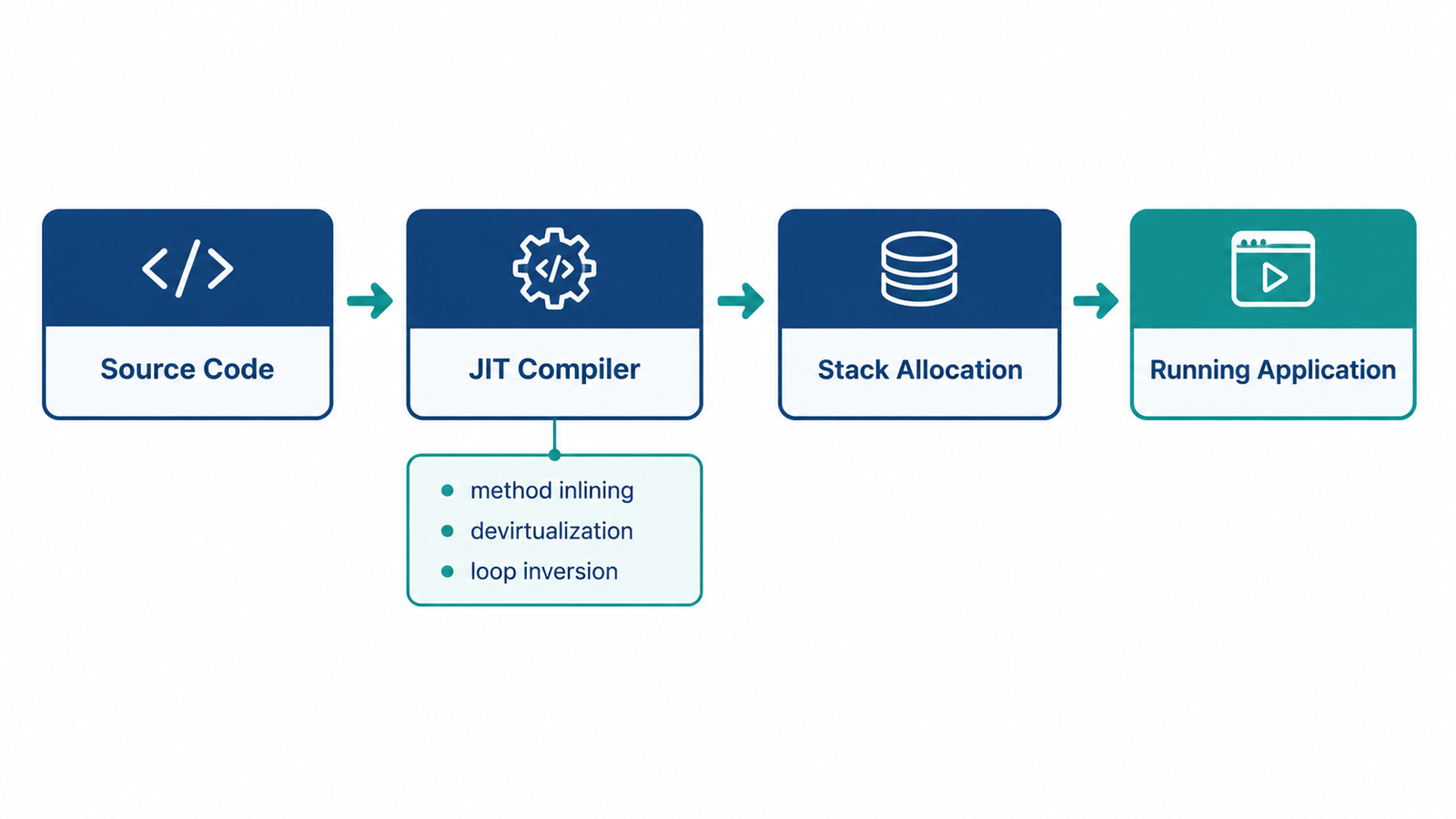
.NET keeps improving performance every release without asking developers to change their code. The .NET 10 runtime introduces improvements in JIT inlining, method devirtualization, and stack allocations, along with AVX10.2 support and enhanced loop inversion.
I am not going to repeat marketing-style claims like “fastest version ever” with made-up numbers, because official published benchmarks vary by workload. What I can say from a practical point of view: if your services are CPU-bound or run at scale, an upgrade to .NET 10 is usually free performance, without touching your code.
EF Core 10: Vector Search and Native JSON
If you work with Entity Framework Core, this release is relevant beyond the usual bug fixes. Entity Framework Core 10 delivers AI-ready vector search, hybrid semantic and full-text search, and native JSON data types in Azure SQL and SQL Server.
For teams adding AI features like semantic search or recommendation systems on top of an existing SQL Server database, this removes the need to introduce a separate vector database just for that use case. It is not always the right trade-off, but it is now an option worth evaluating before adding new infrastructure.
Built-In AI Abstractions
.NET 10 also ships first-class support for building AI-powered features. The Microsoft.Extensions.AI library offers standardized abstractions for AI services, with a unified IChatClient interface that lets developers use AI models from providers such as OpenAI, Azure OpenAI, GitHub Models, or Ollama through a consistent API. There is also first-class support for the Model Context Protocol (MCP), which lets agents securely access external APIs, databases, and services, and developers can create MCP servers directly with new .NET templates.
If you are already gluing together different AI SDKs in your codebase, this abstraction layer is worth a look. It will not replace a dedicated AI orchestration framework for complex agent workflows, but for simple chat completion or embedding calls, it removes a lot of provider-specific code.
.NET 10 vs .NET 9: What Should You Do?
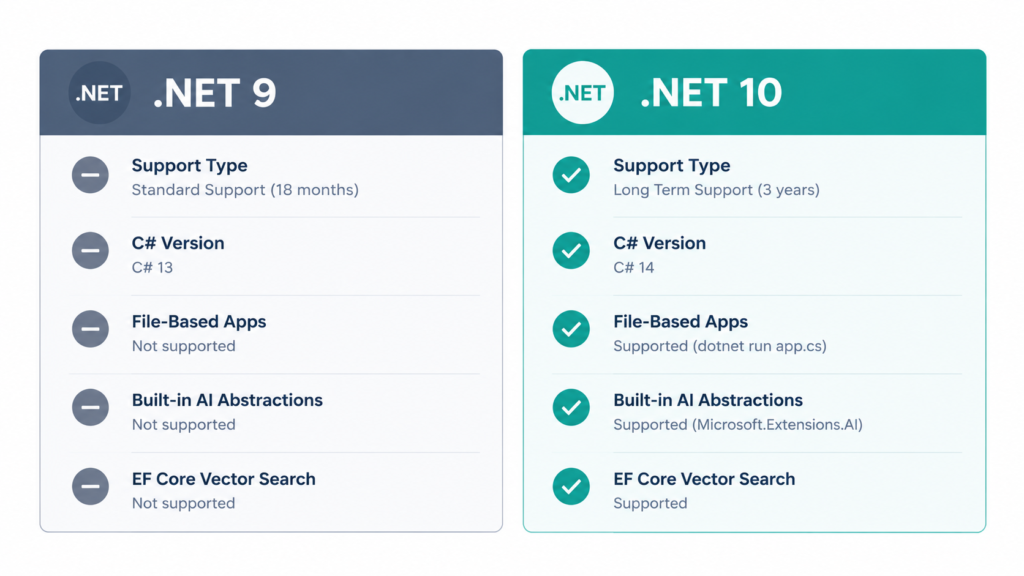
| Feature | .NET 9 | .NET 10 |
|---|---|---|
| Support type | Standard Term (18 months) | Long Term (3 years) |
| C# version | C# 13 | C# 14 |
| Run a single file without a project | Not supported | Supported (dotnet run app.cs) |
| Built-in AI abstractions | Not included | Microsoft.Extensions.AI, MCP support |
| EF Core vector search | Not available | Available |
| JIT and runtime performance | Good | Improved further |
If your project is already on .NET 8 or .NET 9 and stable, there is no emergency to upgrade the same week .NET 10 ships. But since this is an LTS release, it is the natural target for your next planned upgrade cycle, especially if you want the longer support window instead of upgrading again in eighteen months.
Real-World Developer Perspective
When I would use it: New projects starting today, any project already scheduled for a major upgrade, and teams that want the three-year support window instead of chasing STS releases every year.
When I would NOT rush it: Legacy systems with heavy third-party dependencies that have not published .NET 10 compatible packages yet. Always check your critical NuGet dependencies before migrating a production system.
Common trade-off: File-based apps are great for scripts and demos, but do not use them for anything that needs proper testing, dependency injection at scale, or a team of more than one or two people working on the same code.
Common Mistakes Developers Make
- Upgrading production without checking dependency compatibility. Some NuGet packages, especially ones tied to reflection or source generators, need an update to fully support .NET 10. Always test in a staging environment first.
- Treating file-based apps as a replacement for real projects. They are meant for scripts and prototypes, not for services that need structured testing and CI/CD pipelines.
- Assuming every C# 14 feature is required. The
fieldkeyword and extension members are opt-in style improvements. You do not need to rewrite existing code just because a new syntax exists. - Ignoring the LTS support timeline when planning upgrades. Some teams upgrade to every release, including STS versions, and then upgrade again in eighteen months. If stability matters more than having the newest syntax, plan around LTS releases like .NET 10.
- Copying benchmark numbers from blog posts without testing your own workload. Runtime improvements vary a lot depending on what your application actually does. Always benchmark your own hot paths before and after upgrading.
Production Considerations
- Logging and observability: Confirm your logging and tracing libraries (OpenTelemetry exporters, for example) have stable .NET 10 support before rolling this out broadly.
- Native AOT: File-based apps enable Native AOT publishing by default, which is great for CLI tools, but check startup behavior if your app relies on reflection-heavy libraries.
- Rollback plan: As with any major runtime upgrade, keep a rollback path ready. Test the upgrade behind a feature flag or in a canary deployment before a full rollout.
- Security: Review any changes to Identity and authentication, since ASP.NET Core 10 adds passkey support for Identity, which may change your authentication flow if you adopt it.
Conclusion
.NET 10 is not a release built around one giant feature. It is a mix of language polish in C# 14, a genuinely useful scripting mode with file-based apps, steady runtime performance work, and new AI and vector search capabilities in EF Core. For teams planning their next upgrade, the three-year LTS window makes .NET 10 a solid, low-drama target. Test your dependencies, benchmark your own workloads, and move at the pace that makes sense for your project, not the release calendar.
FAQ
Is .NET 10 a Long Term Support (LTS) release?
Yes. .NET 10 is an LTS release supported for three years, until November 2028.
Do I need to learn C# 14 to use .NET 10?
No. C# 14 features like the field keyword and extension members are optional. Existing C# code keeps working without changes.
Can I use file-based apps for a real production API?
You can, but it is not recommended for anything beyond scripts, small utilities, or prototypes. Convert the file into a full project with dotnet project convert once it grows.
Does upgrading to .NET 10 improve performance automatically?
In most cases, yes, thanks to JIT and runtime improvements, but the actual gain depends on your specific workload. Always benchmark before and after.
Is EF Core 10 vector search a replacement for a dedicated vector database?
Not always. It is a good option if you already use SQL Server or Azure SQL and want to avoid adding new infrastructure for smaller-scale AI search features.
External References
- Announcing .NET 10 – .NET Blog: https://devblogs.microsoft.com/dotnet/announcing-dotnet-10/
- What’s new in .NET 10 – Microsoft Learn: https://learn.microsoft.com/en-us/dotnet/core/whats-new/dotnet-10/overview
- What’s new in C# 14 – Microsoft Learn: https://learn.microsoft.com/en-us/dotnet/csharp/whats-new/csharp-14
- File-based apps – .NET | Microsoft Learn: https://learn.microsoft.com/en-us/dotnet/core/sdk/file-based-apps
- Announcing dotnet run app.cs – .NET Blog: https://devblogs.microsoft.com/dotnet/announcing-dotnet-run-app/