


If you build frontend apps with React, you have probably heard a lot of noise about React 19. Some posts call it a revolution. Others barely mention it. The truth is simpler: React 19 features solve real, everyday problems, but not every feature deserves a place in your project right away. In this article, I will walk through what actually shipped, what is stable enough to use today in 2026, and what I would skip for now.
Quick answer: React 19 adds Actions (with useActionState, useFormStatus, and useOptimistic), a stable use() API, ref as a normal prop, built-in document metadata support, and stable Server Components. The React Compiler, released as stable in October 2025, removes most manual memoization. Together, these cut boilerplate in forms and async UI without changing how you think about components.
A Quick Timeline, Because Versions Matter
React 19.0 shipped on December 5, 2024. Since then, the team has kept shipping: React 19.1 in June 2025, React 19.2 in October 2025 with features like <Activity> and useEffectEvent, and patch releases all through 2026, with 19.3.0 landing in September 2026. No React 20 has been announced yet.
One thing also changed behind the scenes: React now lives under an independent React Foundation, hosted by the Linux Foundation, announced in October 2025. This does not change the API, but it does change who governs the project long term, which matters if your company plans around React for the next five years.
Actions: The Real Organizing Idea of React 19
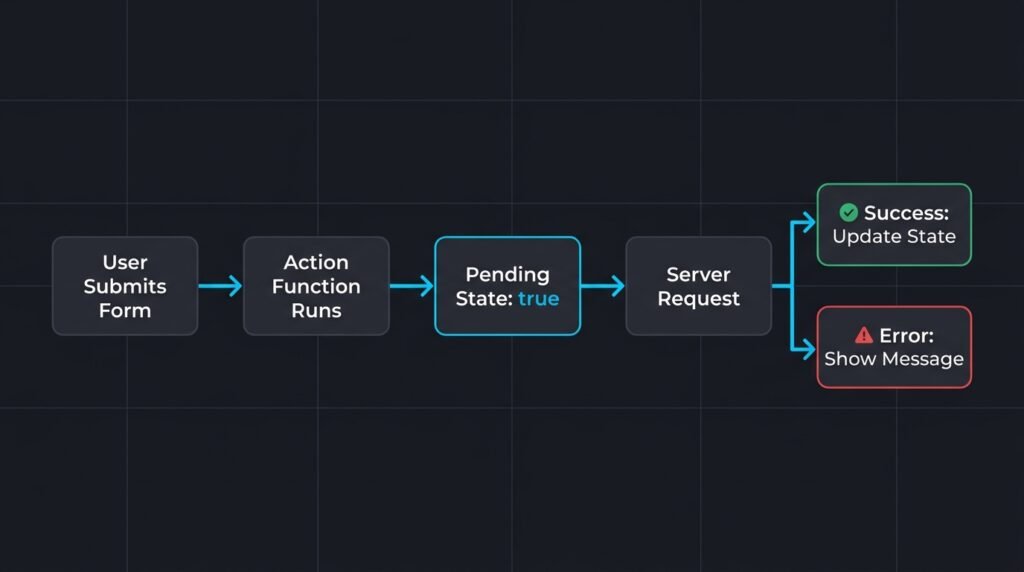
Most “new hooks” in React 19 are not separate features. They are three views on the same idea, called Actions.
useActionStatelets you connect a function to form submission and get back pending state, the result, and errors, without writing your own reducer.useFormStatusreads the pending state of the nearest parent form, so a submit button can disable itself without prop drilling.useOptimisticshows an optimistic UI update while the real request is still running, then reconciles once the server responds.
Here is a small example of a form that saves a comment using useActionState:
import { useActionState } from "react";

async function saveComment(prevState: string | null, formData: FormData) {
  const text = formData.get("comment") as string;
  if (!text.trim()) {
    return "Comment cannot be empty";
  }
  await fetch("/api/comments", { method: "POST", body: formData });
  return null;
}

function CommentForm() {
  const [error, formAction, isPending] = useActionState(saveComment, null);

  return (
    <form action={formAction}>
      <textarea name="comment" disabled={isPending} />
      {error && <p role="alert">{error}</p>}
      <button type="submit" disabled={isPending}>
        {isPending ? "Saving..." : "Save"}
      </button>
    </form>
  );
}
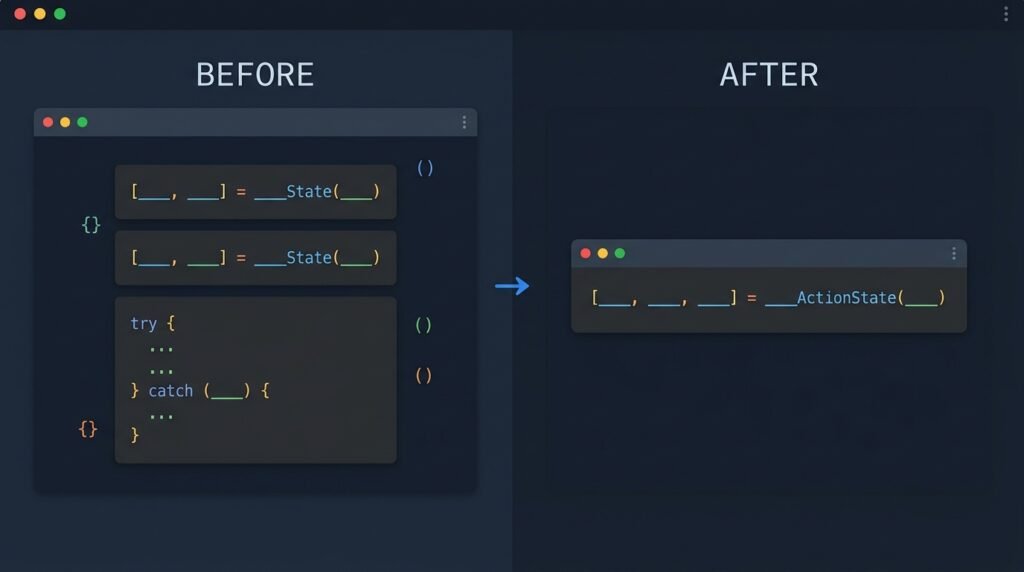
Before React 19, this same behavior needed a manual useState for pending, another for errors, and careful handling of race conditions. Actions do not add new capabilities you could not build yourself, but they remove a lot of repeated code.
The use() API
use() lets a component read a promise or a context value directly during render, and it can be called conditionally, inside an if statement or a loop, unlike other hooks. This is useful when you want to read data that only exists under certain conditions.
A word of caution here: the promise you pass to use() must be created and cached outside of render, for example in a Server Component or a cache layer. If you create a new promise on every render, the component will suspend forever and the loading state will never clear. This single detail causes more confusion than any other part of the use() API.
ref as a Normal Prop
In React 19, you can pass ref to a function component like any other prop, without wrapping it in forwardRef.
function TextInput({ ref, placeholder }: { ref?: React.Ref<HTMLInputElement>; placeholder?: string }) {
  return <input ref={ref} placeholder={placeholder} />;
}
If you maintain a component library, this alone is worth the upgrade. forwardRef was one of the most common sources of confusion for developers new to React, especially those coming from Angular or Vue, where refs feel more direct.
Document Metadata, Built In
React 19 lets you render <title>, <meta>, and <link> tags directly inside any component, and React moves them to the document <head> automatically. This is a big deal for teams that used to depend on libraries like react-helmet just to set a page title from a data-fetching component.
function ProductPage({ product }: { product: Product }) {
  return (
    <>
      <title>{product.name} - My Store</title>
      <meta name="description" content={product.shortDescription} />
      <h1>{product.name}</h1>
    </>
  );
}
React Server Components: Stable, With an Asterisk
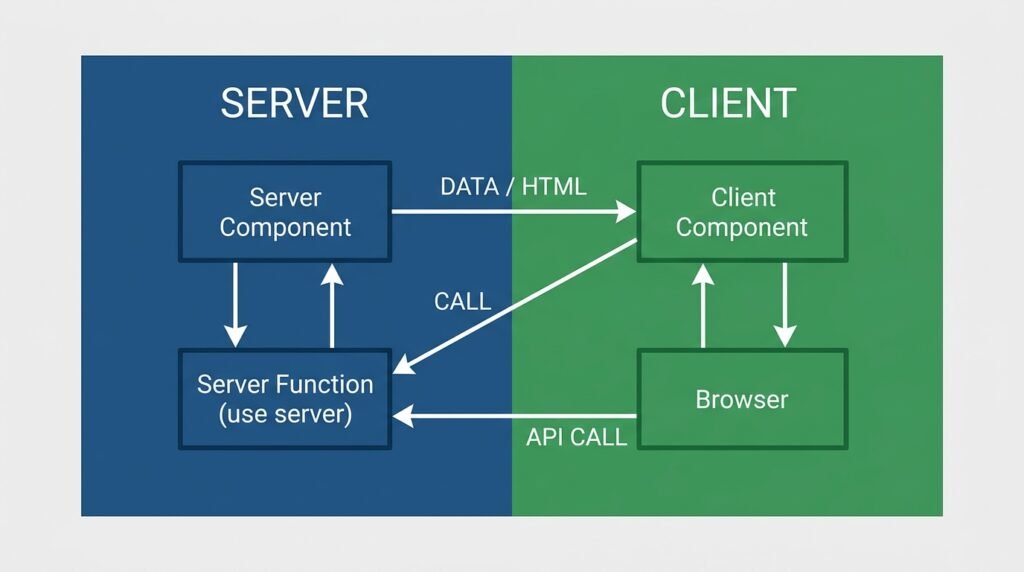
React Server Components and Server Functions (the "use server" functions callable from Client Components) are officially stable in React 19. That said, the React team is clear about one detail: RSC itself will not break between minor versions, but the lower-level APIs that a bundler or framework uses to implement RSC support do not follow semantic versioning and can change between 19.x releases. If you use Next.js, React Router, or another framework with RSC support, this mostly stays invisible to you. If you maintain your own RSC bundler, pin your React version carefully.
There is also a security note worth mentioning for any 2026 upgrade plan: denial-of-service and source-code-exposure issues were found in the react-server-dom-* packages, patched in versions 19.0.4, 19.1.5, and 19.2.4. If your app does not use Server Components, this does not affect you. If it does, through Next.js or another RSC framework, check that your lockfile includes the patched versions.
The React Compiler: Stable Since October 2025
This is, in my opinion, the feature that changes daily work the most. The React Compiler reached its first stable release (v1.0) in October 2025. It runs at build time and automatically memoizes your components and values, so you generally stop needing useMemo, useCallback, and manual React.memo wrapping.
// Before: manual memoization
const activeUsers = useMemo(
  () => users.filter((u) => u.isActive),
  [users]
);

// After: the compiler handles it
function ActiveUsersList({ users }: { users: User[] }) {
  const activeUsers = users.filter((u) => u.isActive);
  return <ul>{activeUsers.map((u) => <li key={u.id}>{u.name}</li>)}</ul>;
}
The React team has pointed to Meta’s own usage as a case study, reporting faster initial loads and noticeably quicker interactions on internal apps after adopting the compiler. Your results will depend on your codebase, but the direction is consistent with what I have seen in smaller projects too: fewer dependency array bugs and less code to review.
The compiler ships with ESLint rules inside eslint-plugin-react-hooks, so your linter and your build tool share the same understanding of what is safe to optimize.
Comparison: React 17 vs React 18 vs React 19
| Feature | React 17 | React 18 | React 19 |
|---|---|---|---|
| Concurrent rendering | No | Yes, opt-in | Yes, default in Actions |
| Automatic batching | Partial | Full | Full |
| Server Components | No | Experimental | Stable |
| Forms and async state | Manual hooks | Manual hooks | useActionState, useFormStatus |
ref on function components | Needs forwardRef | Needs forwardRef | Normal prop |
| Document metadata | External library | External library | Built in |
| Automatic memoization | No | No | Yes, via React Compiler |
| Learning curve | Low | Medium | Medium |
| Production readiness | Legacy, still supported | Solid | Solid, actively patched |
| Best use case | Maintaining old apps | Teams not ready for RSC | New projects and active upgrades |
There is no universal winner here. If you maintain a large legacy app with heavy use of class components and manual forwardRef, the upgrade path takes planning. If you are starting a new project today, React 19 is the sensible default.
When I Would Use This, and When I Would Not
I would reach for React 19 when:
- Starting a new project, so you get the compiler and Actions from day one.
- Your forms have grown a pile of manual pending and error state.
- You maintain a component library and are tired of
forwardRefboilerplate. - You already use Next.js or another framework with solid RSC support.
I would hold off when:
- You have a large legacy codebase full of class components and third-party libraries that have not confirmed React 19 support yet.
- Your team has very thin test coverage. The compiler changes memoization behavior, and without tests you may not notice a regression until production.
- You rely on
react-test-rendererfor testing. It is deprecated in React 19 in favor of Testing Library.
Step-by-Step: Migrating a Form to useActionState
Step 1: Update your dependencies
npm install react@19 react-dom@19Step 2: Identify a form with manual pending and error state
Look for components with a pattern like const [isSubmitting, setIsSubmitting] = useState(false) next to a try/catch block around a fetch call. These are your best migration candidates.
Step 3: Replace the manual state with an Action
Move your submit logic into a standalone async function that takes (prevState, formData) and returns the new state, as shown in the comment form example earlier.
Step 4: Wire up useActionState and test it
Confirm that the pending state disables the correct fields, that errors show up correctly, and that a second submission while pending is blocked as expected.
Step 5: Add the React Compiler for production
Enable the compiler in your build config once your test suite is green. Run your existing test suite twice, once with the compiler and once without, and compare. This catches most memoization-related surprises before they reach users.
Common Mistakes Developers Make
- Creating a new promise on every render for
use(). This causes an infinite Suspense loop. Cache the promise outside the render function. - Assuming the React Compiler fixes bad architecture. The compiler optimizes re-renders, but it will not fix a poorly split component tree or state that lives too high up.
- Skipping the RSC versioning warning. Teams pin React to
^19.0.0and then get surprised when an RSC bundler API changes in a minor release. Pin the exact version if you maintain that layer yourself. - Forgetting to update tests off
react-test-renderer. It still works with a warning, but concurrent rendering behavior in React 19 makes snapshot tests less reliable than before. - Not checking
react-server-dom-*patch versions. If your app uses Server Components, confirm your lockfile is on 19.0.4, 19.1.5, 19.2.4, or later, to avoid the known DoS and source-exposure issues. - Mixing manual
useMemowith the compiler everywhere “just in case.” This adds noise without real benefit once the compiler is active. Remove manual memoization gradually and let your tests confirm nothing broke.
Performance, Security, and Production Considerations
Performance: Automatic batching and the compiler reduce unnecessary re-renders, but they do not replace good data-fetching patterns. Combine React 19 with proper caching at the API layer, whether that is Redis on your backend or cacheSignal on the client for Server Component data.
Security: Update to the patched react-server-dom-* versions if you use Server Components. Also review any third-party form libraries for React 19 compatibility, since some older libraries hook into internals that changed.
Production: Roll out gradually. Enable the compiler on a subset of routes first, watch your error tracking and performance dashboards, then expand. Keep your observability stack (logs, traces, metrics) in place during the migration, since subtle re-render changes are easier to catch with real data than with manual testing alone.
Frequently Asked Questions
Is React 19 backward compatible with React 18?
Mostly yes. Breaking changes are documented in the official upgrade guide, and the team published a React 18.3 release with deprecation warnings to help you prepare before jumping to 19.
Do I need the React Compiler to use React 19?
No. The compiler is a separate, optional build tool. You can use Actions, use(), and the other React 19 features without it.
Is react-test-renderer completely removed?
No, it still works but logs a deprecation warning and has moved to concurrent rendering for web usage. The React team recommends Testing Library instead.
Does React 19 replace Redux or other state managers?
No. Actions solve async form and mutation state specifically. Global app state still benefits from a dedicated state manager in larger applications.
Is React 20 coming soon?
As of this writing, no React 20 has been announced. The team has kept shipping 19.x minor and patch releases instead.
External References
- React v19 — official release notes, react.dev
- React 19 Upgrade Guide — official migration steps, react.dev
- React Compiler v1.0 — official stable compiler announcement, react.dev
- React 19.2 — official minor release notes, react.dev
- React Versions page — full changelog and patch history, react.dev