.NET Aspire is an opinionated, cloud-ready stack introduced by Microsoft to simplify the development of distributed, observable, and production-ready .NET applications. It provides a set of NuGet packages, project templates, and tooling that help you orchestrate services, manage configurations, and integrate observability out of the box, without the usual boilerplate nightmare.
Introduction: Are You Still Doing This the Hard Way?
If you’ve ever spent an entire afternoon configuring Docker Compose, wiring up health checks, setting environment variables for 5 microservices, and then realizing your local setup still doesn’t match production, you’re not alone.
That’s exactly the pain point .NET Aspire was built to solve.
Announced at .NET Conf 2023 and reaching GA in May 2024, .NET Aspire is not just another framework. It’s a new way of thinking about how .NET developers build and run distributed applications, locally and in the cloud. And if you haven’t looked at it yet, you’re leaving productivity on the table.
Let’s break it down.
What Exactly Is .NET Aspire?
.NET Aspire is a stack composed of three main pillars:
- Orchestration: a code-first way to define and connect your services, containers, and dependencies
- Components: pre-built, opinionated integrations for Redis, PostgreSQL, RabbitMQ, Azure Service Bus, and more
- Tooling: a local developer dashboard for real-time observability (logs, traces, metrics)
It’s designed for .NET 8+ and works seamlessly with existing ASP.NET Core projects. Think of it as the glue that holds your distributed system together during development, and beyond.
Why Should You Care? 5 Reasons to Adopt .NET Aspire Today
1. Say Goodbye to Docker Compose Hell
With .NET Aspire, you define your app’s infrastructure in C#. No more YAML files nobody on the team understands. You write:
var builder = DistributedApplication.CreateBuilder(args);

var redis = builder.AddRedis("cache");
var api = builder.AddProject<Projects.MyApi>("api")
                 .WithReference(redis);

builder.Build().Run();
That’s it. Aspire spins up the Redis container and injects the connection string into your API, automatically.
2. Built-in Observability From Day One
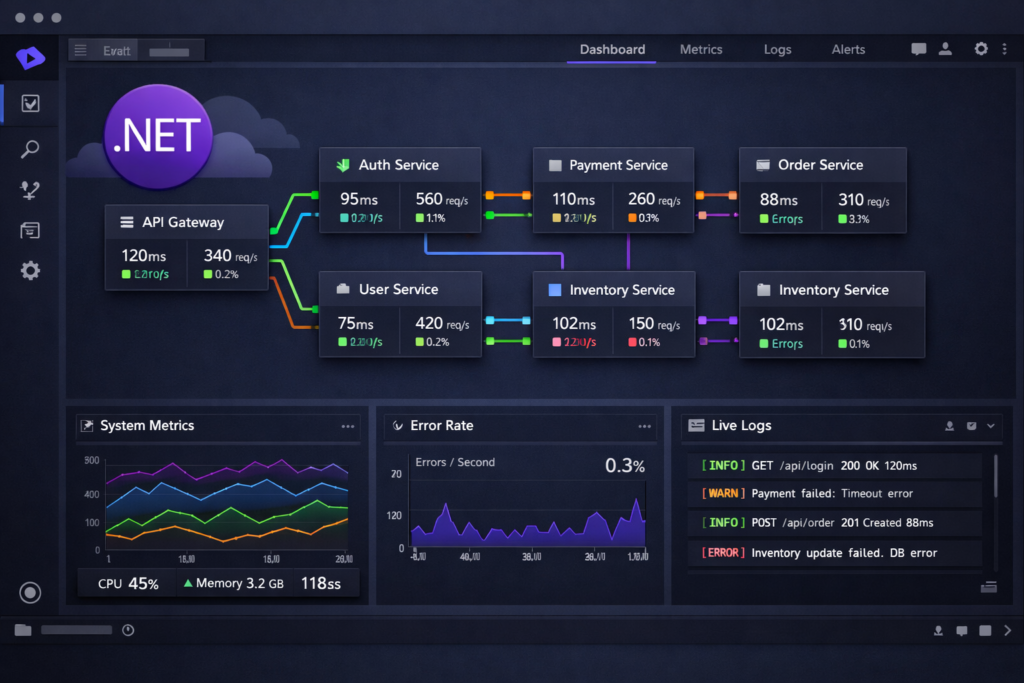
The Aspire Developer Dashboard gives you a unified view of:
- Structured logs from all services
- Distributed traces (OpenTelemetry-compatible)
- Metrics and health checks
No Grafana setup required for local dev. You open http://localhost:15888 and everything is there.
3. Pre-built Components with Sane Defaults
Tired of copy-pasting boilerplate for Entity Framework, Redis, or RabbitMQ? Aspire components wire things up for you:
builder.AddNpgsqlDbContext<AppDbContext>("postgres");Done. Connection string resolved, resiliency policies configured, telemetry hooked in.
4. Scales from Local to Production
Aspire projects deploy naturally to Azure Container Apps using the Azure Developer CLI (azd). The same AppHost definition you use locally becomes the blueprint for your cloud environment.
5. It’s the Future of .NET Distributed Development
Microsoft is betting heavily on Aspire. The ecosystem is growing fast, community components, third-party integrations, and official support for AWS and other providers are already emerging. Getting familiar now means staying ahead of the curve.
.NET Aspire vs Traditional Approaches: Comparison Table
| Feature | Traditional Setup | .NET Aspire |
|---|---|---|
| Service orchestration | Docker Compose / YAML | C# code in AppHost |
| Observability | Manual Grafana/Prometheus setup | Built-in Dashboard |
| Component integration | Manual NuGet + boilerplate | Aspire Components |
| Health checks | Manual implementation | Auto-configured |
| Local → Cloud deploy | Custom CI/CD scripts | azd up via Azure CLI |
| Learning curve | High | Medium (C# native) |
| .NET 8+ required | No | Yes |
Step-by-Step: Building Your First .NET Aspire App
Let’s go from zero to a running distributed app in minutes.
Prerequisites
- .NET 8 SDK or higher
- Docker Desktop (running)
- Visual Studio 2022 v17.9+ or VS Code with C# Dev Kit
Step 1 – Install the Aspire Workload
dotnet workload install aspireStep 2 – Create a New Aspire Starter Project
dotnet new aspire-starter -n HelloAspire
cd HelloAspire
This generates:
HelloAspire.AppHost– the orchestratorHelloAspire.ApiService– a sample Web APIHelloAspire.Web– a Blazor frontendHelloAspire.ServiceDefaults– shared configuration (OpenTelemetry, health checks, resiliency)
Step 3 – Explore the AppHost
Open HelloAspire.AppHost/Program.cs:
var builder = DistributedApplication.CreateBuilder(args);

var apiService = builder.AddProject<Projects.HelloAspire_ApiService>("apiservice");

builder.AddProject<Projects.HelloAspire_Web>("webfrontend")
    .WithExternalHttpEndpoints()
    .WithReference(apiService)
    .WaitFor(apiService);

builder.Build().Run();
Clean, readable, and powerful. The WaitFor call ensures the frontend only starts after the API is healthy.
Step 4 – Run Everything
dotnet run --project HelloAspire.AppHostYou’ll see the Aspire Dashboard open automatically. All services are listed with their status, logs, and traces. Click around, it’s impressive for zero configuration.
Step 5 – Add Redis to the Mix
In AppHost/Program.cs:
var cache = builder.AddRedis("cache");

var apiService = builder.AddProject<Projects.HelloAspire_ApiService>("apiservice")
    .WithReference(cache);
In ApiService/Program.cs, inject IDistributedCache normally, Aspire handles the connection string injection behind the scenes.
Real-World Use Case: To-Do List API with PostgreSQL
Want something more practical? Here’s how you’d wire up a To-Do API backed by PostgreSQL:
AppHost/Program.cs:
var postgres = builder.AddPostgres("db")
                      .AddDatabase("tododb");

builder.AddProject<Projects.TodoApi>("todoapi")
       .WithReference(postgres)
       .WaitFor(postgres);
TodoApi/Program.cs:
builder.AddNpgsqlDbContext<TodoDbContext>("tododb");No connection strings to manage. No environment variable juggling. It just works.
Pro Tips for Getting the Most Out of .NET Aspire
- Use
ServiceDefaultsin every project, it standardizes OpenTelemetry, health endpoints, and resilience policies across your whole solution. - Explore community components at Aspire Community Toolkit, there are integrations for MongoDB, Meilisearch, Ollama, and more.
- Don’t skip the Dashboard, it’s one of Aspire’s best features and the fastest way to debug inter-service issues locally.
- Use
WaitForto control startup order and avoid race conditions between dependent services. - Deploy with
azd, the Azure Developer CLI has native Aspire support and makes cloud deployment feel as easy as local dev.
What .NET Aspire Is NOT
It’s worth being honest here:
- It’s not a service mesh, it doesn’t replace Kubernetes or Istio in production.
- It’s not magic, you still need to understand distributed systems concepts.
- It’s not only for Azure, despite Microsoft roots, you can run Aspire apps on any container platform.
Conclusion: .NET Aspire Is the Developer Experience Upgrade You’ve Been Waiting For
If you’re building distributed applications with .NET, .NET Aspire is no longer optional knowledge, it’s becoming the standard. It removes friction, adds observability, and brings a level of developer experience that the .NET ecosystem has honestly been missing for years.
The learning curve is gentle for anyone already comfortable with ASP.NET Core. And the productivity gains are real from day one.
Start with the starter template, explore the dashboard, add a component or two, and you’ll understand immediately why .NET Aspire is the tool everyone’s talking about.